
COD to Prepaid with Branded WhatsApp
COD to Prepaid helps you convert Cash on Delivery orders into prepaid orders. A WhatsApp message with a payment link invites the customer to pay online, which can reduce returns and RTO.How it works
After a COD order is placed, the customer can receive a WhatsApp message that offers a payment link and a discount. If the customer pays online, the order becomes prepaid.The full COD to Prepaid setup, including the customer journey after the payment link, is covered in Setting COD to Prepaid Conversion in Shopify. This article covers the settings you configure in COD King.
Prerequisites
- COD King installed, with a payment gateway account. The payment account type dropdown on the COD to Prepaid page lists the supported gateways.
- A Thank You page and an Order Status page that can show the COD King app block.
- A connected WhatsApp Business number, if you want to send WhatsApp messages (see Introduction and How It Works).
Step-by-step setup
Step 1: Set up the payment gateway
- Go to COD King → Settings.
- Under COD Workflow, open COD to prepaid.
- In the Payment section, select a Payment account type. The dev store uses Razorpay.
- Enter your API Key and API Secret.
- Click Create test link to generate a ₹1 payment link with your saved keys. The page says this confirms that the setup works for Razorpay, PayU and Cashfree.
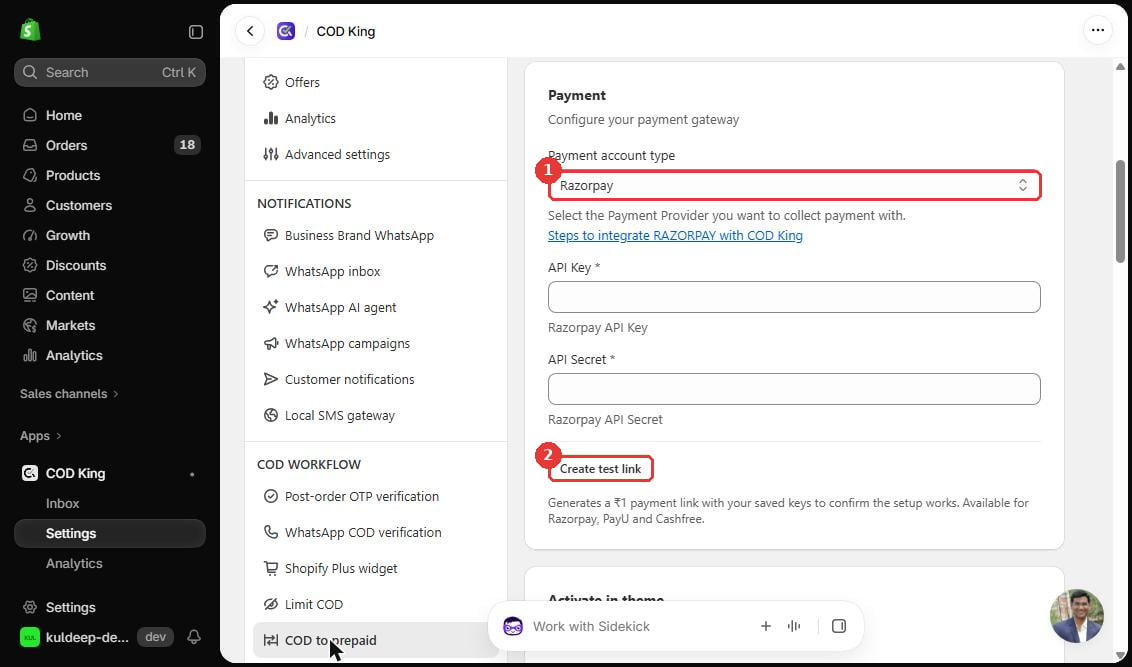
- Payment account type dropdown.
- Create test link button. It generates a ₹1 payment link to test your setup.
Step 2: Turn on the banner in your theme
In the Activate in theme section, both pages are marked Required:- 1. Thank You Page: click Open Thank You Settings.
- 2. Order Status Page: click Open Order Status Settings.
Step 3: Write the banner message
Under Banner Settings, enter the Banner heading shown after a COD order is placed. The dev store example is “Convert your COD order to Prepaid to get ₹150 off and Faster delivery.”Step 4: Set up WhatsApp reminders
Reminder timing, cart range and discount override are configured on the COD to Prepaid page.Configuration options
Practical example
A customer places a COD order for ₹900. The Thank You page shows the banner “Convert your COD order to Prepaid to get ₹150 off.” If the customer pays online with the payment link, the order is converted to prepaid and the store avoids the COD delivery risk.Verification
- Click Create test link and open the link to confirm that it loads.
- Place a test COD order on your store and check that the banner appears on the Thank You page and the Order Status page.
Troubleshooting
- The banner does not appear. Make sure the COD King app block is on for both the Thank You Page and the Order Status Page, then save each page.
- The test link does not work. Check the API Key and API Secret, and make sure they are for the same gateway you selected.
Important notes and limitations
- COD to Prepaid messages are charged at the WhatsApp marketing rate, which is $0.0116 per message on the dev store.
- Keep reminder messages short and clear.